Connect to Your AI in Minutes
Choose your AI platform and follow the steps to get connected.
Connect the NYCU Library App
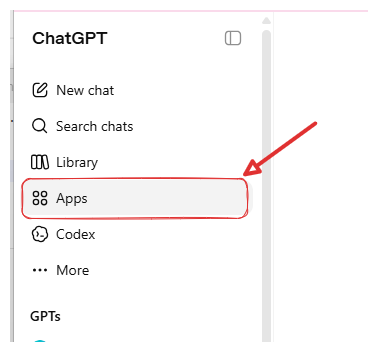
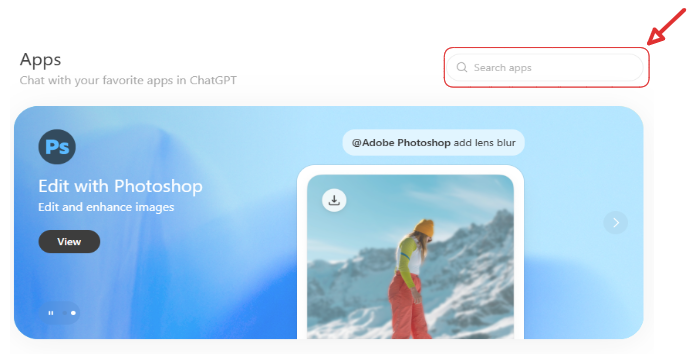
Click the button below to connect via ChatGPT Apps, or manually go to the ChatGPT sidebar → Apps → search NYCU Library → click Connect.
Enable MCP in Your Conversation
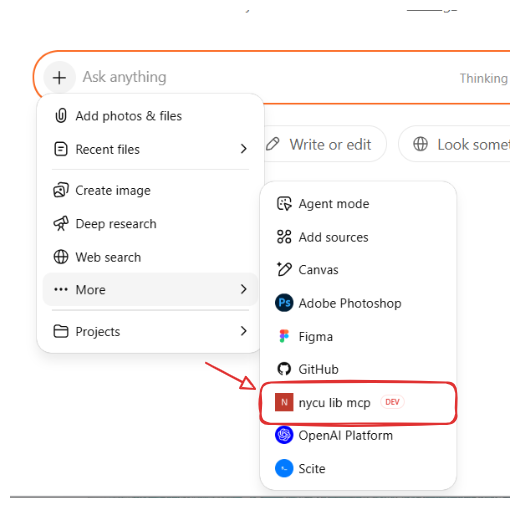
Click + on the left of the input box → More, then select the MCP name (or type /nycu lib mcp to quickly select it).
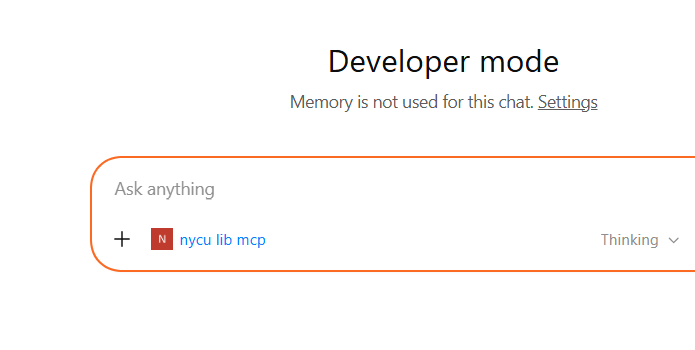
Once enabled, the MCP name appears below the input box — you're ready to chat.
Open Settings
Go to claude.ai/customize/connectors to add a custom connector.
Add MCP Server
- Server Name:
NYCU Library - URL:
https://mcp.lib.nycu.edu.tw/mcp - Click Connect and complete OAuth authentication with your school account
Enable MCP in Conversation
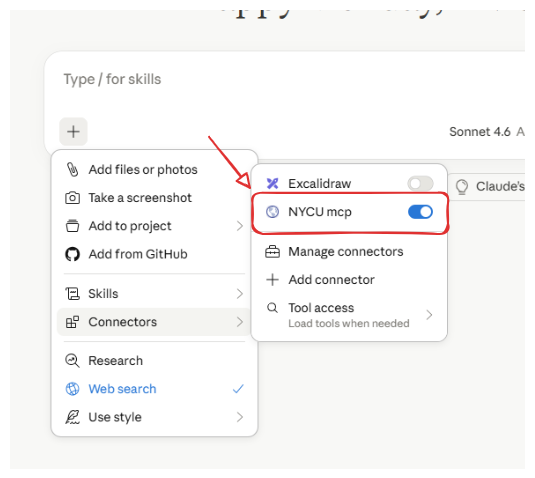
Each new conversation, click + → Connectors on the left of the input box and toggle NYCU mcp on.
✅ The above setup only needs to be done once. After that, simply enable MCP in each new conversation (Step 2) — no reconfiguration needed.
💡 The auth token is valid for 3 days. After expiry, simply log in again to continue.